
Sometimes when you’re out working or capturing something important, you want your photo to show all the stamp details—like location, time, and notes. But other times, you may want to keep the photo clean, without anything extra on it. That’s exactly why the Save Original Photos feature in GPS Map Camera is so useful.
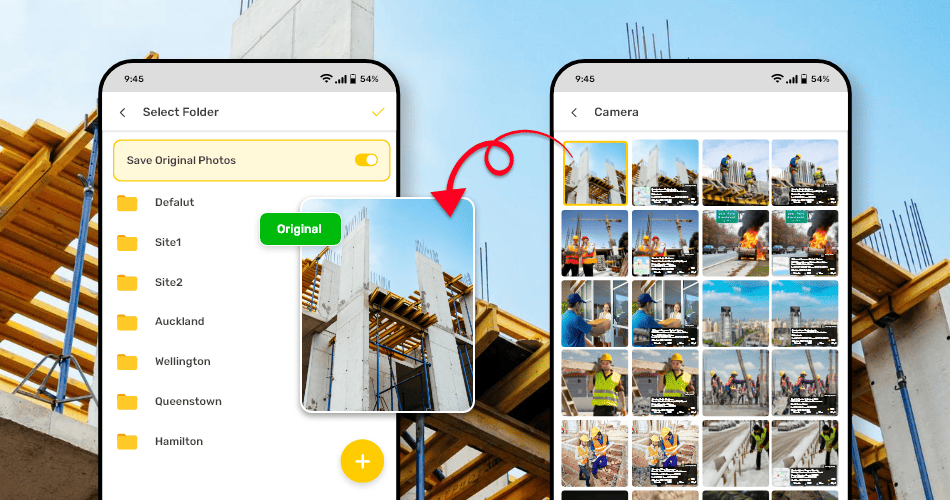
With this feature, you don’t have to choose just one version. The app gives you both.
When you turn it on, every time you capture a photo, the app automatically saves two versions of it:
- One with the GPS stamp showing all the details you’ve selected (like coordinates, address, date, time, hashtags, and more)
- One without any stamp—just the original image, clean and untouched
This gives you total flexibility. You can use the stamped version for work reports, project updates, or location proof. And you can use the plain one for editing, archiving, or sharing in a more personal or creative way.
It’s especially useful for people who:
- Need official photos with data, but also want to keep a clean version for clients
- Share photos publicly but want to avoid showing sensitive location info
- Create reports where both stamped and plain images are required
- Use stamped photos for internal use and clean ones for social media posts
There’s no need to capture the same photo twice or worry about manually editing stamps out later. Just turn on the Save Original Photos option, and let the app handle the rest.
You work hard to capture the right shots. With this feature, GPS Map Camera helps you save smarter—so you always have the version you need, ready when you need it.